
Off-Lot Build/Buy
Description
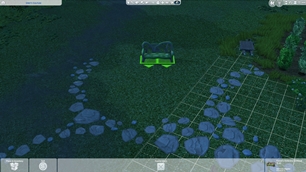
Place, move, clone, eyedrop and delete objects outside your lot with the normal Build/Buy tools, as if the lot boundary reached further into the neighborhood. The reach depends on the lot size: 89 tiles beyond the edge of a 30x20 lot and 55 tiles beyond a 64x64 lot.
Requires Windows; macOS is not supported. Each release works only with the game version it lists. After a game update the mod stays switched off and Build/Buy works as usual until an updated version is released.
Objects still follow the game's normal collision and placement rules and can only go on the ground level. Walls, rooms, floors, roofs, terrain paint, upper floors and basements stay limited to the lot as usual.
Most objects already standing on the street, including the neighborhood's own benches and decorations, can be moved, sold or deleted too. These changes stay in that save.
Objects you place outside the lot stay there after saving, traveling and reloading. The game's nightly street cleanup still applies to them, removing leftover food, trash and puddles.
If you remove the mod, objects outside the lot stay where they are, but you can no longer move or delete them there.
Install: close the game, extract the ZIP, and place Arkhejinn_OffLotBuildBuy.ts4script in Mods/ZCustom. Enable Custom Content and Mods and Script Mods Allowed, then restart the game. Replace the file when updating; remove it to uninstall.
If you get an error, send arkhejinn_offlot_build_buy.log from the Logs folder in your The Sims 4 user folder.
Compatibility: Extends the normal Build/Buy object tools without replacing any game files. If another mod already changes the same Build/Buy placement behavior, this one stays switched off instead of conflicting.