
Height Diversity
Description
Version: 0.4.0
Tested with game version: 1.129.39.1030
What it does
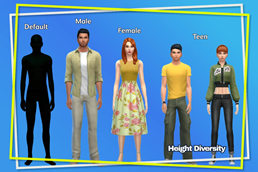
- Automatic heights. A Sim gets the height for its age and gender as soon as it appears in the world, so a save created before you installed the mod and the NPCs around your Sims are covered too, and it gets it again every time it changes age: teens get the teen height, and young adults, adults and elders get the male or female height for their gender. An elder keeps the height of its gender.
- Children, toddlers and infants are not affected.
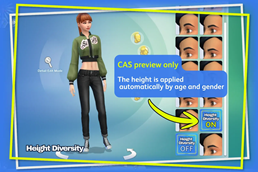
- The same three heights are also available in Create A Sim (CAS) under the Forehead category, so a Sim can also get its height while you edit it. A preset belongs to one age and gender (teen, female, male): the game offers the one that matches the Sim you are editing, so CAS is not a free height choice.
- Back to the original height. A fourth preset in the same Forehead list restores the game's own height while you are in Create A Sim, so you can compare your Sim with and without the mod. It is a compare-only preview: as soon as the Sim enters the world, the mod applies the height for its age and gender again, so the reset never lasts outside CAS.
- Every preset has an icon in CAS, so you can tell them apart at a glance: the three heights share one preview and the "back to default" preset has its own.
- Each height changes the Sim's overall height without deforming the body, and the Sim keeps it through save and reload.
The mod looks at one Sim at a time as it appears instead of running through the whole neighborhood on load, so the cost stays out of the way.
Requirements
- DLC required: None (base game only).
- Script mods allowed in Game Options: Yes.
Installation
- Copy
LyzerVice_HeightDiversity.packageandLyzerVice_HeightDiversity.ts4scriptinto yourMods/folder. - Enable "Custom Content and Mods" and "Script Mods" in Game Options (they are two separate options).
- Restart the game. Heights are applied automatically as your Sims appear in the world and as they change age; in CAS the preset for the Sim's own age and gender is available under the Forehead category.
- Updating from an older version: delete
localthumbcache.packagefromDocuments/Electronic Arts/The Sims 4/before starting the game. It is a thumbnail cache, not a save. The game keeps CAS icons there, so without this step the new preset icons can stay hidden.
Compatibility
- Conflicts: other mods that change how tall Sims are (other height mods) — do not combine.
- Patch sensitivity: the heights rely on game internals that can change with a patch.
Known issues
- A werewolf in beast form has no human body to carry the height, so the mod leaves that form as it is; the Sim gets the height back in human form.
- Changing the previewed age inside CAS does not change the height there. The Sim gets the correct height as soon as it is in the world.
- The "back to default" preset only lasts inside Create A Sim. As soon as the Sim is in the world, the automatic height for its age and gender applies again: the reset is a preview, not a permanent choice.
- If the presets show no icon in CAS, delete
localthumbcache.packagefromDocuments/Electronic Arts/The Sims 4/and start the game again. - All Sims share one set of animations, so Sims of very different heights can look slightly off together in some interactions; adapted animations are planned.
Uninstallation
- Delete
LyzerVice_HeightDiversity.packageandLyzerVice_HeightDiversity.ts4scriptfrom yourMods/folder. The game starts without errors and the Sims return to their default height; the presets disappear from CAS.
License
Free to use in your game, your saves, your videos and your streams — credit Lyzer Vice and link back to the original download. Please do not reupload the files or place them behind a paywall.
Full terms: Lyzer Vice Sims 4 Mod License v1.0. The release zip ships the same full text.
This mod is not affiliated with, endorsed by or supported by Electronic Arts or Maxis.