
Llamafone + Llamadate AI






Description
Llamafone — AI-powered phone mod for The Sims 4
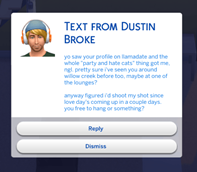
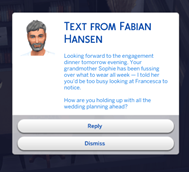
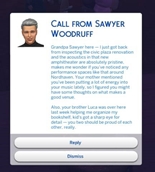
Llamafone is a phone-first AI mod. Random sims call and text you in character — voices shaped by their traits, mood, relationships, careers, breakups, weather, and what's actually happening in your save. Bring your own AI (Claude, OpenAI, Gemini, OpenRouter, or a free local Ollama model on your own machine) and your sim's phone starts feeling like a phone.
v3.6 headlines: Messages move relationships, world context, sim bios, service NPCs, OpenRouter provider.
Flirty and warm texts now nudge Sims 4's own friendship and romance bars (bidirectional, hard-capped, tunable). Add save-wide world context that binds every prompt — challenge rulesets, historical settings, custom lore. Write per-sim character bios (backstory, secrets, quirks) that shape their voice everywhere they appear. Hired service NPCs (butler, maid, babysitter, nanny, gardener, repair tech) now write in the right register. Llamadate matches remember they met on the app across sessions. Fifth AI provider option (OpenRouter — one key, dozens of models). Plus in-prompt time-of-day awareness, an in-game "Update mod" button when a new release is out, and a stack of polish for Llamadate replies.
What it does
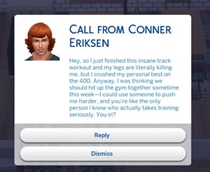
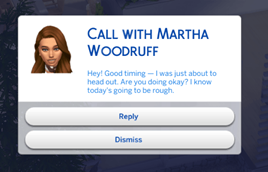
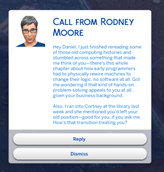
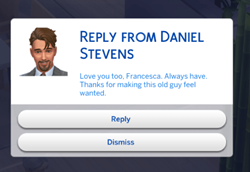
- Phone Calls — random sims call you with a topic in their own voice. Click Reply to keep the conversation going, and their next line reads your last one.
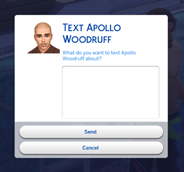
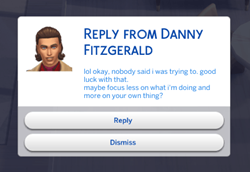
- Text Messages — same for texts, staggered with realistic reply delays so it feels like an actual conversation.
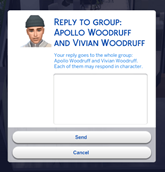
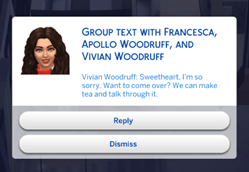
- Group texts (2–4 sims) — one message goes to multiple sims; each replies in their own voice, and every reply sees what the others just said. No chorus of "same".
- Auto-Events — random calls, texts, storylines, and events fire in the background while you play. Every N real-world minutes.
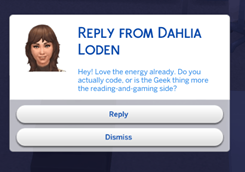
- Llamadate (NEW in v3.5) — an opt-in dating layer per played sim. Set your bio, browse Hinge-style profiles, send intros, or wait for a match to text you first. Reply-gated: interested replies add them to your contacts, polite declines don't.
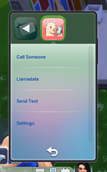
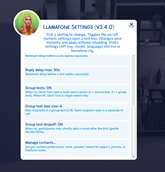
- Standalone Llamafone tile (NEW in v3.5) — Call, Send Text, Llamadate, and Settings all live under a dedicated home-screen tile on the phone.
- Interacts with your game — messages apply small moodlets and relationship changes where it makes sense.
- Messages move relationships (NEW in v3.6). Warm, flirty, or hostile messages nudge Sims 4's actual friendship and romance tracks — bidirectional and hard-capped so a single text can't reshape a relationship.
It knows what's actually going on
What the AI sees before it writes a single word:
- Sim identity — name, age stage, gender, up to 6 traits, current mood, career, aspiration, top 3 skills, clubs, home world.
- Family role — "Vivian is Francesca's Mother." Parents text like parents, not peers. Family role dominates trait-driven voice.
- Friendship and romance labels — "best friends" / "recent breakup" / "actively dislike." Current status overrides old chat history.
- Breakup and sentiment bits (v3.5) — broken engagements, bad-romance bits, cheating history, "Bitter Over Phone Breakup" sentiments, all with direction preserved ("you feel bitter toward them", "they cheated with you").
- Household composition — who they live with and what those people are up to.
- Live weather — light rain, thunderstorm, heatwave. Dramatic weather is fair game; routine weather stays background. Off-world callers know THEIR climate (Sulani stays tropical during global winter).
- Recent milestones — promotions, breakups, new babies, aging up. Surfaced once per contact so nobody keeps asking about a job you quit five sim-days ago.
- Past shared events — parties, weddings, funerals, birthdays, holidays. The AI can say "great party last night" the morning after.
- Today's holidays — Love Day, Winterfest, Talk Like A Pirate Day, custom holidays.
- Upcoming calendar events — with real focal sims ("in memory of Sawyer", "for Alex and Bailey"), no invented details.
- Recent in-person contact — chats, kisses, arguments, co-presence on the same lot, logged with sim-time recency ("~15 in-game min ago", "2 in-game days ago").
- Group text history — when Alice and Sarah were both in a group thread with Bob, that thread's excerpt lands in Alice ↔ Sarah 1:1 prompts.
- Mutual contacts — shared friends and family with their careers, traits, ages, home worlds. Plausibility rules stop the AI from name-dropping a mutual whose vibe doesn't fit the topic.
- Contact preferences you set — mute / paused / priority state plus your freeform note. Hoisted to the end of the prompt so the AI weights it heavily.
- Journal history for this pair — recent calls and texts between the two sims. Filtered to entries BEFORE the current in-progress conversation so nothing double-counts.
Family-role references. When one family member mentions another, they use the relationship from the recipient's perspective ("your dad", "your sister") instead of the first name.
In-game timestamps everywhere. Contact preferences, interactions, and journal entries all use sim-world time in prompts.
Llamadate details
- Per-sim opt-in. Each household sim opts in independently under Llamafone Settings → Dating. Off by default.
- Bio-only privacy. If you write a Llamadate bio, matches see only that — not your career, engagement, aspirations, or kids. Skip the bio and matches see the usual sim context.
- Mutual-friend intros when a real shared friend exists on both sides. The intro frames as a warm friend-of-a-friend introduction and never mentions the dating app. When there's no mutual, it's an explicit Llamadate match with an invented plausible detail tied to the sender's traits.
Bring your own AI
Llamafone talks to an AI service that generates the text. You choose which one in llamafone.cfg:
Claude / OpenAI / Gemini — cloud services. Bring your own API key from console.anthropic.com, platform.openai.com/api-keys, or aistudio.google.com/apikey.
OpenRouter (NEW in v3.6) — one key, dozens of models (Claude, GPT, Llama, Mistral, DeepSeek, etc.) via
vendor/modelnaming. Useful for A/B-testing models without juggling separate accounts.Ollama — the local, no-account option for technical users. Runs an AI model on your own PC, no internet needed after model download. Install from ollama.com and
ollama pull llama3.2:3bto get started. Requires a reasonably capable GPU and comfort with the command line.
You configure exactly one provider in llamafone.cfg. Run llama.testconnection in the cheat console after setup for an end-to-end diagnostic.
Installation
- Download the release ZIP and extract it.
- Drop Llamafone.ts4script and Llamafone.package into your Mods folder (typically Documents\Electronic Arts\The Sims 4\Mods\).
- Start the game with the mod installed to auto create your .cfg file. You can also download the file here. It goes in your Mods folder.
- Open llamafone.cfg in any text editor. Pick your
providerand paste your API key (or leave the default settings if using Ollama). - In-game: Game Options → Other → enable Custom Content and Script Mods, then restart.
- You'll see a notification when the mod loads. Type
llama.statusin the cheat console to confirm setup and list all commands. Or just open the new Llamafone tile on your sim's phone.
Additional information: https://morganparadis.github.io/llamafone/#install
Requirements
- The Sims 4 base game
- Custom Content and Script Mods enabled
- Windows, macOS, or Linux (Steam Proton) — script mod runs on all three
- No packs required, but pack-specific content (Snowy Escape weather, My Wedding Stories weddings, Cats & Dogs pets, etc.) enriches prompts when installed
Compatibility
- No known conflicts with major script mods
- Per-save data (journals, past events, group threads, contact prefs, Llamadate opt-ins/bios) lives under saves/Llamafone/Slot_NNNNNNNN/ — multiple saves don't cross-contaminate
- Silent failures — network or AI issues never interrupt gameplay
- All API calls run on background threads; no game freezes
Source, docs, and support
- Full docs and screenshots: morganparadis.github.io/llamafone
- Issues and feature requests: GitHub Issues