

Careers/Jobs for dogs & cats – Paws At Work
Description
🐾 PAWS AT WORK 💼
Give your cats and dogs a real job, with a schedule, a paycheck and promotions.
✅ Compatible with the October 27, 2026 game update (game version 1.129.39.1230). Tested on October 28, 2026. No mod update needed.
Your Sims go to work every day, so why not their pets? Train your dog or discipline your cat, then send them to work: police tracking dog, therapy dog, dog actor, search and rescue dog, barn cat, cat café cat, library cat or cat food model. They leave on schedule, vanish while they are at work just like your Sims, and come back home hungry, tired and proud, with a paycheck for the household. Work well, get promoted, earn more!
✨ Features
🐶 4 jobs for dogs
Dogs get hired thanks to the commands they have learned.
| Job | Schedule | Commands needed | Good at it | Struggling | Pay per shift |
|---|---|---|---|---|---|
| Police Tracking Dog | Mon to Fri, 8 am to 2 pm | Sit, Heel, Fetch | Smart, Curious, Loyal | Skittish, Lazy | §40 to §160 |
| Therapy Dog | Tue, Thu, Sat, 10 am to 2 pm | Sit, Lie Down, Shake | Friendly, Loyal | Aggressive | §30 to §120 |
| Dog Actor | Sat and Sun, 9 am to 5 pm | Play Dead, Roll Over, Speak, Shake | Playful, Vocal | Skittish | §80 to §350 |
| Search and Rescue Dog | Mon, Wed, Fri, 6 am to 2 pm | Heel, Fetch | Active, Hunter | Lazy, Glutton | §60 to §240 |
🐱 4 jobs for cats
Cats get hired thanks to their good manners (or their lack of bad habits).
| Job | Schedule | Needed | Good at it | Struggling | Pay per shift |
|---|---|---|---|---|---|
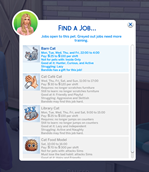
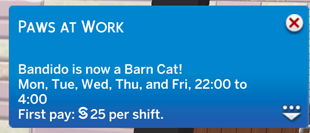
| Barn Cat | Mon to Fri, 10 pm to 4 am | Must not be an indoor-only cat | Hunter, Curious, Active | Lazy | §25 to §100 |
| Cat Café Cat | Wed to Sun, 11 am to 5 pm | No longer scratches furniture | Friendly, Playful | Aggressive, Skittish | §30 to §120 |
| Library Cat | Mon to Sat, 9 am to 3 pm | No longer jumps on counters | Lazy, Independent | Active, Naughty | §25 to §100 |
| Cat Food Model | Saturday, 10 am to 4 pm | Must not attack Sims | Hairy, Friendly | Aggressive | §70 to §300 |
💼 Hiring
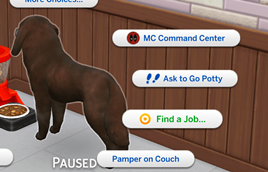
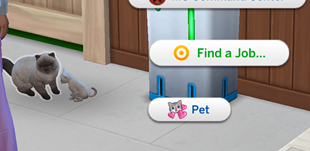
- Click your adult or elder cat or dog with any Sim of the household and choose "Find a Job…".
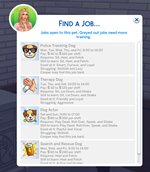
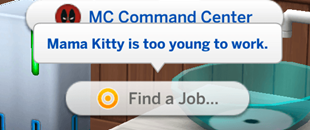
- The list shows every job for this species with its schedule, its pay, what it needs, and what your pet still has to learn. Jobs your pet can't take yet are greyed out with the reason.
- It also tells you if your pet has a gift for the job, or may find it hard, based on its personality traits.
- One job per pet.
🚪 Going to work
- At the start of the shift, your pet walks to the edge of the lot and vanishes: you don't see it at work, just like your Sims.
- Speed 3 still works while your pet is away.
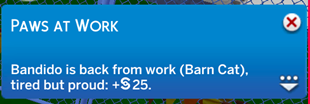
- When the shift ends, it comes back home hungrier and more tired (the longer the shift, the more tired), and the household receives the pay.
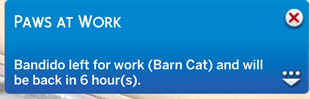
- A notification tells you when your pet leaves, when it comes back and how much it earned.
- Saving and reloading during a shift is fine: your pet stays at work until the end of its shift.
📈 Performance and promotions
- Every shift earns performance points. Your pet earns more if it has the traits that help in this job, if it is in a good mood when it leaves (happy, excited…) and, for dogs, if it knows more commands than needed. It earns fewer points if it has the traits that hinder it or leaves in a bad mood (sad, angry, scared, ashamed…).
- At 100 points: promotion! 5 levels per job, and the pay goes up with each level.
- A missed shift (your pet is sick, missing, or busy elsewhere) costs points. Three missed shifts in a row and your pet is let go.
- "Job Info" on your pet shows its job, level, pay, progress to the next promotion, shifts worked, money earned and next shift.
- "Quit Job" if your pet deserves a quiet retirement.
🌟 And also
- When you play another household, the working pets of your other households keep their job and work off-screen.
- The French texts agree with your pet's gender.
- Translated into English, French, Spanish, German and Italian. Other game languages display English.
- No dependency: you do NOT need Sims 4 Community Library (S4CL) or any other mod.
📋 Requirements
- Cats & Dogs: required.
- Script mods must be enabled: Game Options > Other > "Script Mods Allowed", then restart the game.
- Tested on game version 1.128.90.1230.
💾 Installation
Download and unzip the file.
Move the "PawsAtWork" folder (with its 2 files) into your Mods folder: Documents > Electronic Arts > The Sims 4 > Mods
Make sure both files are there:
PawsAtWork.ts4scriptPawsAtWork.package
⚠️ The .ts4script file must not be more than ONE folder deep inside Mods.
Start the game and make sure script mods are enabled.
🎮 How to use
- Train your dog (Sit, Heel, Fetch…) or discipline your cat (scratching furniture, jumping on counters…) as usual in the game.
- Click your pet with one of your Sims and choose "Find a Job…".
- Pick a job: your pet is hired and leaves at the start of its next shift.
- Keep your pet happy before work to get promoted faster!
❓ FAQ & known limitations
- "Find a Job…" is missing? Only adult and elder cats and dogs of your household can work, and not while they are missing. Type
pawsatwork.diagnosein the cheat console (Ctrl + Shift + C): it checks that everything is installed. Also check that script mods are enabled. - My pet didn't leave for work. A pet that is sick, missing or busy elsewhere when its shift starts misses the shift. If you load your game in the middle of a shift and less than one hour is left, the shift is skipped (not counted as missed).
- If you call your pet back before the end of its shift, the shift is not paid.
- Small dogs can work as dogs. Horses can't work.
- See all your working pets: type
pawsatwork.statusin the cheat console. - Want to test without waiting?
pawsatwork.start_shiftsends your working pets to work now for one hour, andpawsatwork.end_shiftbrings them back with their pay. - Where is the mod's data saved? In Documents > Electronic Arts > The Sims 4 > saves > PawsAtWork (one small file per save). Keep this folder with your saves if you back them up or move them to another computer.
🐞 Found a bug?
Please leave a comment with:
- what you were doing when it happened,
- the file Documents > Electronic Arts > The Sims 4 > Mods > PawsAtWork.log,
- your last exception file (lastException.txt, or mc_lastexception.html if you use MC Command Center),
- the result of
pawsatwork.diagnoseif an option is missing.
🗑️ Uninstall
Make sure none of your pets is at work (wait for the end of the shift, or type pawsatwork.recall in the cheat console), save your game, then delete the "PawsAtWork" folder from your Mods folder. Your saves stay safe. You can also delete the "saves > PawsAtWork" folder if you don't plan to reinstall the mod.
🌍 Translations
English, French, Spanish, German, Italian. The German, Italian and Spanish texts use the game's own vocabulary but haven't been checked by native speakers yet. Spotted a mistake or want to translate the mod into your language? Leave a comment!
💜 Credits & terms
Made by Little Unicorn. Free for everyone. Please don't re-upload this mod anywhere else or claim it as your own: share the link to this page instead. Good dog, good cat, good job! 🐾