
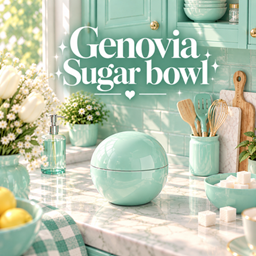
Genovia Sugar Bowl
Description
✨ GENOVIA SUGAR BOWL
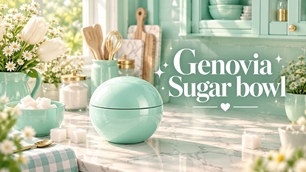
Bring a fresh pop of color to ur Sims’ kitchen with the Genovia Sugar Bowl! 🍬✨
This cute and simple sugar bowl features a smooth rounded design with a glossy finish, making it the perfect little decorative piece for kitchen counters, shelves, coffee stations, and other cozy kitchen spaces.
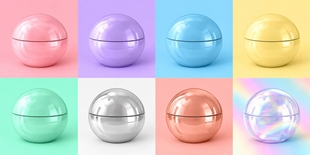
With a mix of dreamy Genovia pastels, metallic finishes, holographic shine, and classic colors, there’s a swatch for almost every kitchen style! 💗
I started making custom content simply because I wanted more colorful and aesthetic objects in my own game, but I figured it would be way more fun to share them with u too!
Everything I create is something I’d genuinely want in my own game, and I hope u’ll love having it in urs just as much 💗
🎨 FEATURES
• 11 color swatches
• Glossy, metallic & holographic finishes
• Smooth rounded sugar bowl design
• Perfect for kitchen counters, shelves & coffee stations
• Perfect for pastel, modern, colorful & luxury kitchens
• Recolored by Genovia Studio 💗
• Original mesh by Bambi
🎨 AVAILABLE COLORS
• Glossy Tosca
• Glossy Pink
• Glossy Lilac
• Glossy Sky Blue
• Glossy Butter Yellow
• Holographic
• Silver
• Gold
• Rose Gold
• Pearl White
• Glossy Black
📌 IMPORTANT
This is a recolor, so the original mesh is required for this item to appear correctly in ur game.
Please download the original Nookline Kitchen by Bambi before using this recolor.
✨ ORIGINAL MESH / REQUIRED DOWNLOAD
Bambi • Nookline Kitchen:https://www.curseforge.com/sims4/build-buy/nookline-kitchen
All credit for the original mesh goes to Bambi. This package only contains my custom recolors 💗
📦 INSTALLATION
- Download the original Nookline Kitchen by Bambi from the link above.
- Download the Genovia Sugar Bowl package.
- Place both files in ur Documents > Electronic Arts > The Sims 4 > Mods folder.
- Make sure Custom Content and Mods are enabled in ur game settings.
- Restart the game and find the Genovia Sugar Bowl in Build/Buy Mode.
- Pick ur favorite swatch and enjoy! ✨
💗 CREDITS
Original Mesh & Design: Bambi
Recolor: Genovia Studio
A huge thank u to Bambi for creating the original mesh and allowing recolors 🫶✨
Hope this little sugar bowl adds an extra pop of color to ur Sims’ kitchens! 🍬💗