
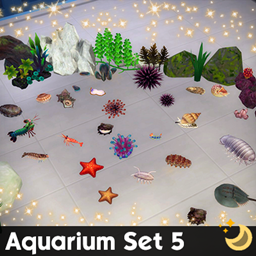
Aquarium Set 5
Description
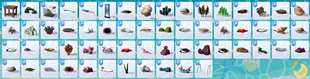
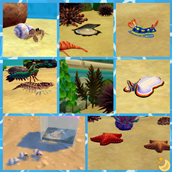
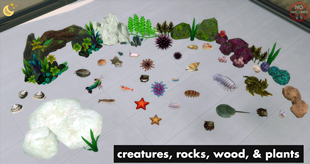
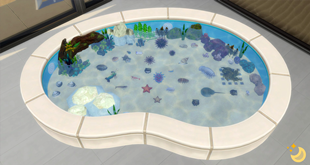
59 Maxis Match items to make & decorate a tide pool exhibit, and a pearl diving exhibit. Large items can be placed on any floor/ground. Decors can go on any surface/floor/ground. The pool item is slotted for lots of creatures and decor.
✨ More aquarium-related CC linked below item list!
- Always suggested: bb.moveobjects ON (it makes placing items wherever you want much easier)
- Use the scale up & scale down feature on your keyboard to make the items larger or smaller to your liking. If you have a non-US keyboard, it may be different keys depending on which alphabet it uses.
- Raise & lower objects with the 0-9 keys (if you want them in a place other than a surface's slot or the ground)
- For further tweaking options, check out the TOOL mod!
- Abalone 1: 1 swatch
- Acorn Barnacle 1-2 (2 items): 6 swatches each
- Chambered Nautilus: 5 swatches
- Clam 1-3 (3 items): 2 swatches each
- Flatworm: 2 swatches
- Giant Isopod: 2 swatches
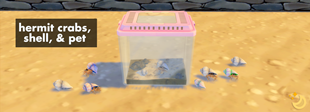
- Hermit Crab 1-2 (2 items) : 2 swatches each
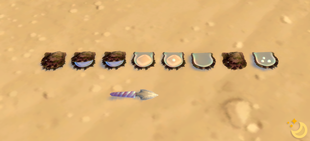
- Hermit Crab Pet: 8 swatches for lid color
- Hermit Crab Shell: 4 swatches
- Horseshoe Crab: 2 swatches
- Mantis Shrimp: 1 swatch
- Mussel: 3 swatches
- Mussels: 3 swatches
- Oyster: 1 swatch
- Oyster Knife: 6 swatches
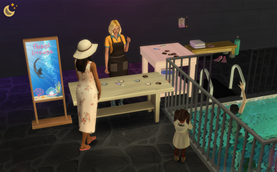
- Pearl Diving Pool Bars: 2 swatches
- Pearl Diving Sign: 8 swatches for frame color
- Pearl Diving Table: 6 swatches
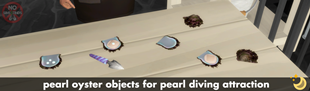
- Pearl Oyster 1-8 (8 items): 1 swatch each, oysters with peal exposed have 4 swatches
- Plant: 1 swatch
- Rock 1-7 (7 items): some have multiple swatches
- Scallop 1-2 (2 items): 5 swatches
- Sea Cucumber: 5 swatches
- Sea Grapes: 2 swatches
- Sea Pig: 3 swatches
- Sea Pineapple 1-2 (2 items): 2 swatches each
- Sea Slug: 5 swatch
- Sea Star 1-2 (2 items): 5 swatches each
- Sea Urchin: 4 swatches
- Seaweed 1-2 (2 items): 1 swatch each
- Sea Anemone: 5 swatches
- Shrimp: 1 swatch
- Slate Pencil Urchin: 6 swatches
- Small Pool (lots of slots!): 6 swatches
- Tiger Prawn: 5 swatches
- Turban Shell: 1 swatches
- Whelk: 6 swatches
- Wood Arch and Plants: 1 swatch
✨ Aquarium Set 1 is here!: https://www.curseforge.com/sims4/build-buy/aquarium-set-1
✨ Aquarium Set 2 is here!: https://www.curseforge.com/sims4/build-buy/aquarium-set-2
✨ Aquarium Set 3 is here!: https://www.curseforge.com/sims4/build-buy/aquarium-set-3
✨ Aquarium Set 4 is here!: https://www.curseforge.com/sims4/build-buy/aquarium-set-4
✨ Seashells Set is here!: https://www.curseforge.com/sims4/build-buy/seashells-set
✨ Ocean Research Set is here!: https://www.curseforge.com/sims4/build-buy/ocean-research-set
Remember to check out the rest of my CC!: https://www.curseforge.com/members/simdertalia/projects
Follow me! ❤️ https://bio.link/simdertalia
I hope you enjoy!
Any community support helps me to manage my chronic pain & chronic illness, & I'm forever grateful! ❤️ (Ko-Fi)
WCIF (where can I find) Friendly! If there is something in one of my preview images that you want for your game, and you don't know where to find it, just ask! 💗
& Please tell me in the comments if there is something that your sims need! If it's something I'm able to do I'd love to make it
⭐️ If you are having issues in game with any build/buy CC, check if you are using DX11, and if you are, run the DX11 batch fix with Sims 4 Studio. (Content management → Batch Fixes → Misc. → Update Images for DX11) It is very easy, and will fix any CC for this that might have been needed.
To see if you are using DX11:
- Open The Sims 4.
- Go to Options Menu → Game Options → Graphics.
- Look for the “Renderer” or “Graphics API” option.
- If it says DirectX 11, then you’re using DX11.
- On some versions, this option may automatically be set based on your system and not displayed explicitly.