
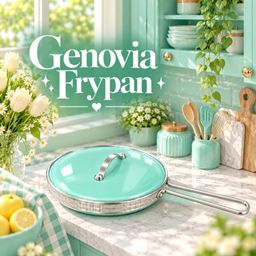
Genovia Frying Pan
Description
✨ Genovia Kitchen • Fry Pan
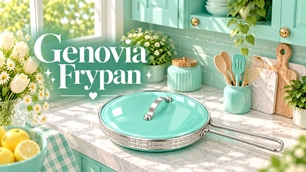
Add a touch of color and shine to your Sims’ kitchen with the Genovia Fry Pan • Glossy Collection! 🍳✨
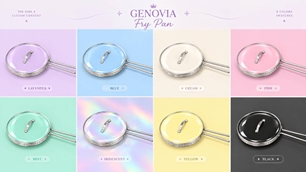
A stylish recolor featuring 8 glossy swatches, from dreamy Genovia pastels to a beautiful holographic finish and classic black. Designed to bring a fun, polished touch to your Sims’ kitchens while fitting beautifully into modern, pastel, colorful, and elegant interiors.
✨ FEATURES
• 8 beautiful color swatches
• Glossy high-shine finish
• Pastel, holographic & classic color options
• Perfect for modern, pastel, colorful, and elegant kitchens
• Custom recolors by Genovia Studio
🎨 INCLUDED SWATCHES
🩷 Glossy Pink
💜 Glossy Lilac
🩵 Glossy Sky Blue
🤍 Pearl White
💛 Glossy Butter Yellow
🌈 Pearl Holographic
🩵 Glossy Tosca
🖤 Glossy Black
📦 INSTALLATION
-
Click the Download button on this CurseForge page.
-
Download the
.zipfile. -
Extract the
.zipfile. -
Move the included
.packagefile into:
Documents > Electronic Arts > The Sims 4 > Mods
-
Open The Sims 4.
-
Go to Game Options > Other.
-
Make sure Enable Custom Content and Mods is enabled.
-
Restart the game if necessary.
-
Find your new fry pan in-game and enjoy! 🍳✨
💜 CREDITS
Original Mesh: Bambi
Recolors, Custom Swatches, Thumbnails & Presentation: Genovia Studio
This item is a recolor of Bambi’s original mesh. Genovia Studio does not claim ownership of the original mesh.
Please support the original creator and respect their Terms of Use regarding the original mesh and resources.
💜 THANK YOU!
Thank you for downloading and supporting Genovia Studio!
I hope these colorful little swatches bring a little extra shine to your Sims’ kitchens ✨🍳
Enjoy decorating! 💜
#TheSims4 #Sims4CC #Sims4CustomContent #KitchenCC #FryPan #KitchenDecor #PastelCC #Sims4Recolor #GenoviaStudio